In mid-November I copied an old token balance script of mine onto a new machine. I copied only the script file, not its package.json, and ran npm install @solana/web3.js. The new package.json listed ^3.2.1.
The script had been written for v1. My code had not changed. The package under it had. As of November 2026, the latest tag of @solana/web3.js on npm is 3.2.1, released on 10 November 2026, and it depends on @solana/kit. Version 3 keeps the classic API but runs it on Kit, with breaking changes, and the last v1 release is 1.99.0 (release notes). So a fresh npm install @solana/web3.js no longer gives you the v1 library that most token tutorials were written for.
If I have to touch the code anyway, I would rather move straight to Kit. This tutorial starts from @solana/kit 8.6.0, the latest release as of November 2026.
We will build a small CLI, a token inspector. You give it one address and it works out what that address is:
- a wallet: it lists every token the wallet holds, across both token programs
- a mint: it prints supply, decimals, authorities, Token-2022 extensions and metadata, wherever the metadata lives
I build Solana token tooling, and the edge cases in this tutorial are the ones that made my own token readers print wrong numbers. Here is what the finished inspector printed for the BONK mint on 21 November 2026:
{
  "type": "mint",
  "address": "DezXAZ8z7PnrnRJjz3wXBoRgixCa6xjnB7YaB1pPB263",
  "program": "Token",
  "name": "Bonk",
  "symbol": "Bonk",
  "metadataSource": "metaplex pda",
  "supply": "87994290480625.99521",
  "decimals": 5,
  "mintAuthority": null,
  "freezeAuthority": null,
  "extensions": []
}
What you need:
- Node.js 22 or newer. Node 20 reached end of life on 30 April 2026. I ran everything on Node 24.13.1.
- Basic TypeScript.
- No wallet, no keys, no SOL. Every call is a read against mainnet. Nothing signs or sends a transaction.
The finished code is in the solana-token-inspector repo.
Set up the project
Start in an empty folder:
npm init -y
npm install --save-exact @solana/kit@8.6.0 @solana-program/token@0.18.0 @solana-program/token-2022@0.20.1 @solana/sysvars@8.6.0
npm install --save-exact -D typescript@7.0.2 tsx@4.23.15 @types/node@24.19.2
I pin exact versions on purpose. The Token-2022 JS client went from 0.17 to 0.20.1 between 10 September and 4 November 2026. With a caret range on a 0.x package that moves this fast, a reader next month can end up with different code than the one I tested. @solana/sysvars is a peer dependency of the Token-2022 client, so I install it explicitly.
Notice what is missing: no @solana/web3.js, no @solana/spl-token, no Metaplex package. After the install, npm ls @solana/kit showed a single copy of Kit, 8.6.0, used by every package. I will come back to why that matters in the metadata section.
Add "type": "module" to package.json (the repo has the full file) so top-level await works. Then a tsconfig.json:
{
  "compilerOptions": {
    "target": "ES2022",
    "module": "NodeNext",
    "moduleResolution": "NodeNext",
    "allowImportingTsExtensions": true,
    "noEmit": true,
    "strict": true,
    "skipLibCheck": true,
    "types": ["node"]
  },
  "include": ["src"]
}
We never compile to JavaScript. tsx runs the .ts files directly, and tsc --noEmit only checks types. That is why imports can end in .ts.
Now the RPC client, in src/rpc.ts:
import { createSolanaRpc } from '@solana/kit';
import { pathToFileURL } from 'node:url';

// Public endpoint from the Solana docs. Fine for a tutorial, rate limited for real apps.
export const RPC_URL = process.env.RPC_URL ?? 'https://api.mainnet.solana.com';
export const rpc = createSolanaRpc(RPC_URL);

// getMultipleAccounts takes at most 100 addresses per call, so batch reads go in chunks.
export async function inChunks<T, R>(items: T[], size: number, fn: (chunk: T[]) => Promise<R[]>): Promise<R[]> {
  const out: R[] = [];
  for (let i = 0; i < items.length; i += size) out.push(...(await fn(items.slice(i, i + size))));
  return out;
}

// True when this file is the one you ran with `npx tsx`, false when it is imported.
export function isMain(moduleUrl: string): boolean {
  return process.argv[1] !== undefined && moduleUrl === pathToFileURL(process.argv[1]).href;
}

if (isMain(import.meta.url)) {
  const slot = await rpc.getSlot().send();
  const { epoch } = await rpc.getEpochInfo().send();
  console.log({ rpc: RPC_URL, slot, epoch });
}
Run it with npx tsx src/rpc.ts:
{
  rpc: 'https://api.mainnet.solana.com',
  slot: 471970014n,
  epoch: 1092n
}
Two Kit habits show up already. Every RPC call is built first and then sent with .send(). And u64 values come back as native bigint, which is why the slot and epoch print with an n.
The URL is the one the official clusters page lists for mainnet. Many older tutorials use api.mainnet-beta.solana.com. When I tested on 21 November 2026, both answered with the same slot, but I use the documented one. The public endpoints allow 100 requests per 10 seconds per IP, and 40 per 10 seconds for any single RPC method. The docs say they are not for production. For real traffic, set RPC_URL to your own endpoint.
The isMain helper lets every file run on its own and also be imported by the final CLI. inChunks comes back later.
Wallet, token account, mint: who owns what
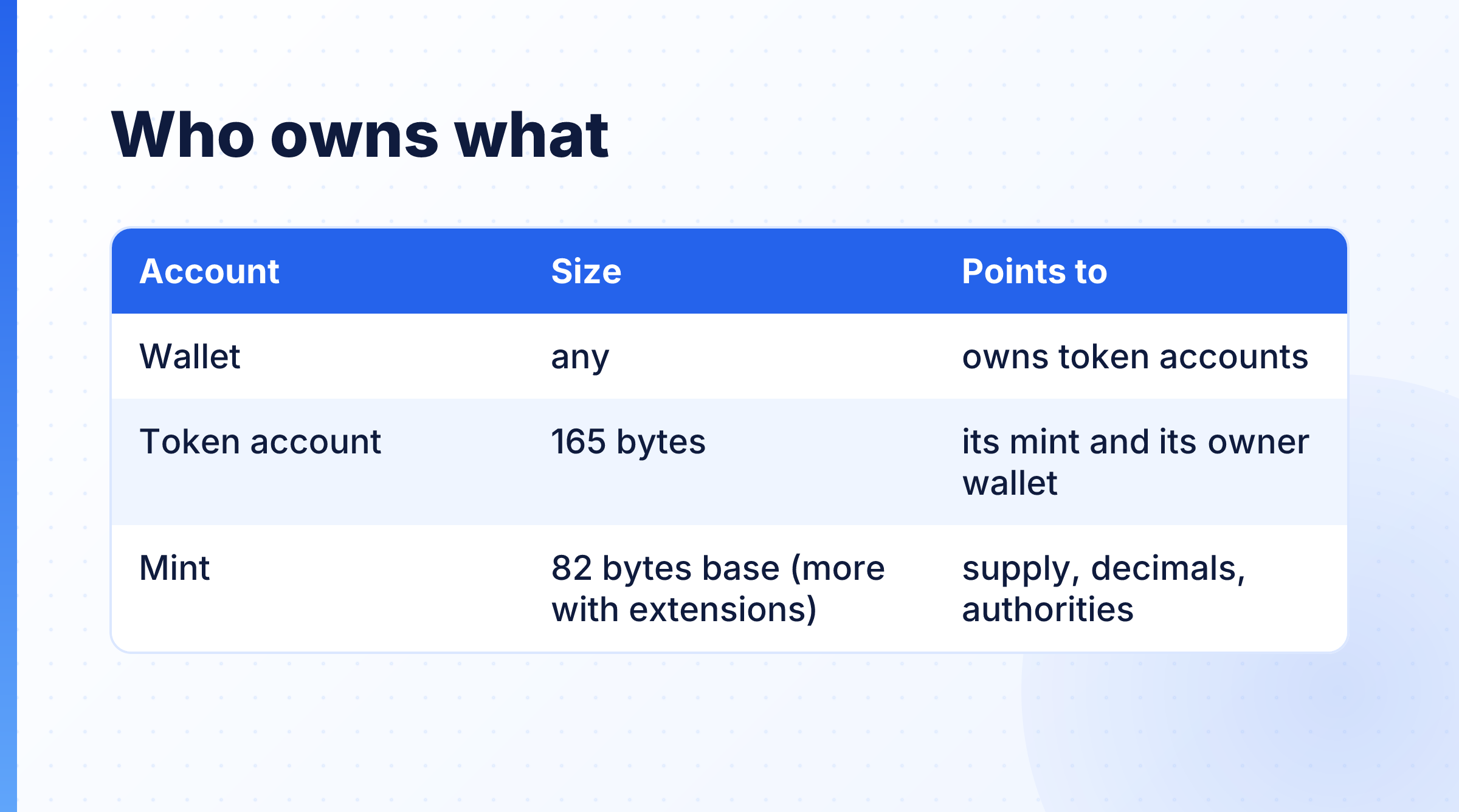
A wallet does not hold tokens directly. Each token balance sits in a separate token account. A token account is 165 bytes. Its owner field is the wallet, and its mint field points to the mint. The mint holds the facts about the token itself: supply, decimals and the two authorities. A plain mint is 82 bytes. A Token-2022 mint with extensions is bigger.
There are also two token programs, and both are live on mainnet:
- Token:
TokenkegQfeZyiNwAJbNbGKPFXCWuBvf9Ss623VQ5DA(TOKEN_PROGRAM_ADDRESSin@solana-program/token) - Token-2022:
TokenzQdBNbLqP5VEhdkAS6EPFLC1PHnBqCXEpPxuEb(TOKEN_2022_PROGRAM_ADDRESSin@solana-program/token-2022)
A mint belongs to one of them, and so does every token account for that mint. The rest of the tutorial follows from this picture. To list a wallet's tokens, we look for token accounts owned by the wallet. To read a token, we read its mint.
List every token a wallet holds
The RPC method is getTokenAccountsByOwner. It needs a filter: either one mint or one programId. There is no "all programs" option, so to list everything you call it once per token program and merge the results. Here is src/balances.ts:
import { address, type Address } from '@solana/kit';
import { TOKEN_PROGRAM_ADDRESS } from '@solana-program/token';
import { TOKEN_2022_PROGRAM_ADDRESS } from '@solana-program/token-2022';
import { isMain, rpc } from './rpc.ts';

export type Holding = {
  tokenAccount: Address;
  mint: Address;
  program: 'Token' | 'Token-2022';
  amount: bigint; // raw units
  decimals: number;
  uiAmountString: string; // what the RPC says a wallet should show
  state: 'initialized' | 'frozen' | 'uninitialized';
};

const PROGRAMS = [
  { programId: TOKEN_PROGRAM_ADDRESS, name: 'Token' },
  { programId: TOKEN_2022_PROGRAM_ADDRESS, name: 'Token-2022' },
] as const;

// getTokenAccountsByOwner only searches one program per call, so ask both and merge.
export async function getHoldings(owner: Address): Promise<Holding[]> {
  const responses = await Promise.all(
    PROGRAMS.map(({ programId }) =>
      rpc.getTokenAccountsByOwner(owner, { programId }, { encoding: 'jsonParsed' }).send(),
    ),
  );

  return responses.flatMap((response, i) =>
    response.value.map(({ pubkey, account }) => {
      const info = account.data.parsed.info;
      return {
        tokenAccount: pubkey,
        mint: info.mint,
        program: PROGRAMS[i].name,
        amount: BigInt(info.tokenAmount.amount),
        decimals: info.tokenAmount.decimals,
        uiAmountString: info.tokenAmount.uiAmountString,
        state: info.state,
      };
    }),
  );
}

if (isMain(import.meta.url)) {
  // Default: USDC's mint authority, a public address anyone can look up on an explorer.
  const owner = address(process.argv[2] ?? 'BJE5MMbqXjVwjAF7oxwPYXnTXDyspzZyt4vwenNw5ruG');
  const holdings = await getHoldings(owner);
  console.table(
    holdings.map(({ mint, program, uiAmountString, state }) => ({ mint, program, amount: uiAmountString, state })),
  );
}
Run npx tsx src/balances.ts:
┌─────────┬────────────────────────────────────────────────┬──────────────┬──────────────┬───────────────┐
│ (index) │ mint                                           │ program      │ amount       │ state         │
├─────────┼────────────────────────────────────────────────┼──────────────┼──────────────┼───────────────┤
│ 0       │ 'JA1SyycEdeuVxNfJyXnhP63E37MFbmUTBd2uDgavZE9L' │ 'Token'      │ '30000000'   │ 'initialized' │
│ 1       │ 'CA4ppFfrVWPsBPY1BezLhY7vnY1qtjhfNPoqb56fLGtw' │ 'Token'      │ '250000000'  │ 'initialized' │
│ 2       │ 'A49NCfXSLbzRoAxHbLYsVaBrQh3Mz1tp5zoZdySKA7H5' │ 'Token'      │ '5379947103' │ 'initialized' │
│ 3       │ 'E4w6KCf4mkm37GWZvzQRA4QBgQMwv9s9b2QnLSnS8wM8' │ 'Token'      │ '35000000'   │ 'initialized' │
│ 4       │ 'ExBdYtURRdYonEW3BRLR86EhWsHm3KBEtf9XZwMYCpSv' │ 'Token'      │ '15000'      │ 'initialized' │
│ 5       │ 'MaxEArHihenC7dXcNtuD18h2WbkWhw9GnBAxUQNaqRA'  │ 'Token'      │ '50000000'   │ 'initialized' │
│ 6       │ 'T8oUYXYyeNvFG5QGhUK58AsxAkpn2vWJ54Vm8dqpEez'  │ 'Token-2022' │ '1000'       │ 'initialized' │
└─────────┴────────────────────────────────────────────────┴──────────────┴──────────────┴───────────────┘
Look at row 6. A query against the Token program alone would never show it. In my experience, older wallet balance tutorials often make that mistake, and the user only notices when a token goes "missing".
Some other choices in this code are on purpose too.
I pass { encoding: 'jsonParsed' } explicitly. The RPC methods in Kit have several overloads, one per encoding, and Kit had a GitHub issue about TypeScript autocomplete struggling with those overloads. With the encoding spelled out, TypeScript picks the right one, and account.data.parsed.info is fully typed. tsc accepts the file without a single cast.
state is where a frozen account shows up: it reads 'frozen' instead of 'initialized'.
The same mint can appear in more than one row, because one owner can hold several token accounts for one mint. I tested on another address that had six rows for a single Token-2022 mint. This code lists token accounts. It does not add them up per mint.
These tokens are spam that landed in the wallet. When I later ran the full inspector on this wallet, the token in row 1 reported its symbol as USDC. Its mint is not USDC's mint. Anyone can set a symbol to any string. Only the mint address identifies a token.
Formatting amounts without floats
Each token account carries tokenAmount: a raw amount (a string holding a u64), decimals, uiAmount and uiAmountString. Kit marks uiAmount as deprecated in its types. It is a JavaScript number, and numbers lose precision on large amounts. When I need to format a raw amount myself (for a mint's supply, for example), I do it with BigInt math. If decimals are new to you, here is a plain explainer on token supply and decimals. src/format.ts:
import { isMain } from './rpc.ts';

// Turn a raw u64 amount into a decimal string without ever touching floats.
export function formatAmount(raw: bigint, decimals: number): string {
  if (decimals === 0) return raw.toString();
  const base = 10n ** BigInt(decimals);
  const whole = raw / base;
  const fraction = (raw % base).toString().padStart(decimals, '0').replace(/0+$/, '');
  return fraction ? `${whole}.${fraction}` : whole.toString();
}

if (isMain(import.meta.url)) {
  console.log(formatAmount(1_000_500n, 6)); // 1.0005
  console.log(formatAmount(42n, 9)); // 0.000000042
  // A big raw amount, once with BigInt math and once with float math:
  const raw = 123_456_789_012_345_678n;
  console.log(formatAmount(raw, 9)); // 123456789.012345678
  console.log(Number(raw) / 1e9); // the last digits are lost
}
Output of npx tsx src/format.ts:
1.0005
0.000000042
123456789.012345678
123456789.01234569
The first line matches the example in Kit's own type docs. The last line is float math on the same raw amount, and its last digits are wrong.
The balance table still uses uiAmountString and not formatAmount, for one reason: on some Token-2022 mints, raw divided by 10 to the power of decimals is the wrong display amount. We get to that in the extensions section.
Read a mint: supply, decimals and authorities
To read a mint, I use fetchMaybeMint from @solana-program/token-2022. The Token-2022 client decodes both kinds of mint. I tested it on the legacy USDC mint, which the classic Token program owns, and it decoded cleanly with no extensions. One client covers both programs.
It does not check which program owns the account, though. The account object has a programAddress field, so I read it and report it myself. src/mint.ts:
import { address, unwrapOption, type Address } from '@solana/kit';
import { TOKEN_PROGRAM_ADDRESS } from '@solana-program/token';
import { TOKEN_2022_PROGRAM_ADDRESS, fetchMaybeMint } from '@solana-program/token-2022';
import { formatAmount } from './format.ts';
import { isMain, rpc } from './rpc.ts';

export function programName(programAddress: Address): string {
  if (programAddress === TOKEN_PROGRAM_ADDRESS) return 'Token';
  if (programAddress === TOKEN_2022_PROGRAM_ADDRESS) return 'Token-2022';
  return `not a token program (${programAddress})`;
}

// One client decodes both kinds of mint. It does not check the owner, so we report it.
export async function readMint(mintAddress: Address) {
  const mint = await fetchMaybeMint(rpc, mintAddress);
  if (!mint.exists) return null;

  const mintAuthority = unwrapOption(mint.data.mintAuthority);
  const freezeAuthority = unwrapOption(mint.data.freezeAuthority);
  return {
    mint,
    summary: {
      address: mint.address,
      program: programName(mint.programAddress),
      supply: formatAmount(mint.data.supply, mint.data.decimals),
      decimals: mint.data.decimals,
      mintAuthority: mintAuthority ?? 'none (revoked, fixed supply)',
      freezeAuthority: freezeAuthority ?? 'none (revoked)',
    },
  };
}

if (isMain(import.meta.url)) {
  const target = address(process.argv[2] ?? 'EPjFWdd5AufqSSqeM2qN1xzybapC8G4wEGGkZwyTDt1v');
  const result = await readMint(target);
  console.log(result ? result.summary : `No account at ${target}`);
}
fetchMint throws when the account does not exist. fetchMaybeMint returns an object with exists: false instead, which is easier to handle in a CLI that accepts any address.
The two authorities are typed Option<Address>, not Address | null. Kit's unwrapOption turns None into null. Here is BONK, with npx tsx src/mint.ts DezXAZ8z7PnrnRJjz3wXBoRgixCa6xjnB7YaB1pPB263:
{
  address: 'DezXAZ8z7PnrnRJjz3wXBoRgixCa6xjnB7YaB1pPB263',
  program: 'Token',
  supply: '87994290480625.99521',
  decimals: 5,
  mintAuthority: 'none (revoked, fixed supply)',
  freezeAuthority: 'none (revoked)'
}
The supply is what it was on 21 November 2026. For USDC, the default, both authorities are set, and the supply changes between runs because USDC is minted and burned all the time.
This is what revoking a mint authority looks like in the data: the field is empty. The Token program's source puts it plainly: "If no mint authority is present then the mint has a fixed supply and no further tokens may be minted."
Decode Token-2022 extensions
A Token-2022 mint starts with the same base fields as a classic mint. After them comes zero padding up to 165 bytes, one account-type byte, and then a list of extensions, each stored as type, length and value.
You do not have to parse those bytes. The client already decodes them into mint.data.extensions, an Option holding an array, where each entry has a __kind. Client 0.20.1 knows 29 kinds. I decode the ones that change how you should read or trust a token and print the rest by name. src/extensions.ts:
import { address, isSome, unwrapOption, type Address } from '@solana/kit';
import {
  amountToUiAmountForMintWithoutSimulation,
  type Extension,
  type Mint,
  type TransferFee,
} from '@solana-program/token-2022';
import { formatAmount } from './format.ts';
import { readMint } from './mint.ts';
import { isMain, rpc } from './rpc.ts';

// olderTransferFee applies before newerTransferFee.epoch, newerTransferFee from then on.
export function feeInForce(
  ext: Extract<Extension, { __kind: 'TransferFeeConfig' }>,
  currentEpoch: bigint,
): TransferFee {
  return currentEpoch < ext.newerTransferFee.epoch ? ext.olderTransferFee : ext.newerTransferFee;
}

export async function describeExtensions(mintAddress: Address, mint: Mint, currentEpoch: bigint) {
  const extensions = isSome(mint.extensions) ? mint.extensions.value : [];
  const out: Record<string, unknown>[] = [];

  for (const ext of extensions) {
    switch (ext.__kind) {
      case 'TransferFeeConfig': {
        const fee = feeInForce(ext, currentEpoch);
        out.push({
          kind: ext.__kind,
          feeInForce: `${fee.transferFeeBasisPoints / 100}% (${fee.transferFeeBasisPoints} bps)`,
          maximumFee: formatAmount(fee.maximumFee, mint.decimals),
          feeSinceEpoch: fee.epoch,
          currentEpoch,
        });
        break;
      }
      case 'MetadataPointer': {
        const target = unwrapOption(ext.metadataAddress);
        out.push({
          kind: ext.__kind,
          metadataAddress: target,
          pointsTo: target === null ? 'nothing' : target === mintAddress ? 'the mint itself' : 'another account',
        });
        break;
      }
      case 'NonTransferable':
        out.push({ kind: ext.__kind, meaning: 'holders cannot transfer this token' });
        break;
      case 'PermanentDelegate':
        out.push({ kind: ext.__kind, delegate: ext.delegate, meaning: 'can transfer or burn from any holder' });
        break;
      case 'ScaledUiAmountConfig':
      case 'InterestBearingConfig': {
        // Display amount is NOT raw / 10^decimals here. Let the client do the math.
        const oneToken = 10n ** BigInt(mint.decimals);
        const shownAs = await amountToUiAmountForMintWithoutSimulation(rpc, mintAddress, oneToken);
        out.push({
          kind: ext.__kind,
          ...(ext.__kind === 'ScaledUiAmountConfig'
            ? {
                multiplier: ext.multiplier,
                newMultiplier: ext.newMultiplier,
                newMultiplierFrom: new Date(Number(ext.newMultiplierEffectiveTimestamp) * 1000).toISOString(),
              }
            : { currentRateBps: ext.currentRate }),
          rawAmount: oneToken,
          naiveDisplay: formatAmount(oneToken, mint.decimals),
          correctDisplay: shownAs,
        });
        break;
      }
      default:
        out.push({ kind: ext.__kind }); // the other kinds: listed by name only
    }
  }
  return out;
}

if (isMain(import.meta.url)) {
  const target = address(process.argv[2] ?? '2b1kV6DkPAnxd5ixfnxCpjxmKwqjjaYmCZfHsFu24GXo');
  const [result, epochInfo] = await Promise.all([readMint(target), rpc.getEpochInfo().send()]);
  if (!result) throw new Error(`No mint at ${target}`);
  console.log(result.summary.program, target);
  console.log(await describeExtensions(target, result.mint.data, epochInfo.epoch));
}
TransferFeeConfig stores two fees, olderTransferFee and newerTransferFee, each with the epoch it starts from. The older one applies until the current epoch reaches newerTransferFee.epoch. If you print only one of them, you can show a fee that is not in force. That is why the script fetches the epoch with getEpochInfo. Fees are in basis points (1 bp is 0.01%), with a separate maximum fee in tokens. The default mint, PYUSD, has this extension: on 21 November 2026 the fee in force was 0 bps with a maximum of 0, set from epoch 605, while the current epoch was 1092. So the logic runs on a real mint, even though this particular fee is zero.
MetadataPointer says which account holds the token's metadata. We use it in the next section.
NonTransferable has no fields. The program source describes it as "Indicates that the tokens from this mint can't be transferred".
PermanentDelegate is the one I always check first on an unknown Token-2022 mint. The field doc calls it an "Optional permanent delegate for transferring or burning tokens", and the official guide describes it as a global delegate over every token account of that mint, which holders cannot revoke. PYUSD has one, and so does the next example. Whatever the reason a mint has it, I think a token reader should always show it to the user.
When raw / 10^decimals is the wrong answer
Two extensions change the display amount: ScaledUiAmountConfig and InterestBearingConfig. For these mints, dividing the raw amount by 10 to the power of decimals does not give the amount the token is meant to display. The Token-2022 client ships amountToUiAmountForMintWithoutSimulation(rpc, mint, amount), which reads the mint and the clock sysvar and applies the right math.
Here is McDonald's xStock (MCDx), a Scaled UI Amount mint, with npx tsx src/extensions.ts XsqE9cRRpzxcGKDXj1BJ7Xmg4GRhZoyY1KpmGSxAWT2:
Token-2022 XsqE9cRRpzxcGKDXj1BJ7Xmg4GRhZoyY1KpmGSxAWT2
[
  {
    kind: 'MetadataPointer',
    metadataAddress: 'XsqE9cRRpzxcGKDXj1BJ7Xmg4GRhZoyY1KpmGSxAWT2',
    pointsTo: 'the mint itself'
  },
  {
    kind: 'PermanentDelegate',
    delegate: '5aMNNLQJwAEeoemTEMkv5NVjqKwvvefRYCQ5Z67HFvEq',
    meaning: 'can transfer or burn from any holder'
  },
  { kind: 'DefaultAccountState' },
  {
    kind: 'ScaledUiAmountConfig',
    multiplier: 1.0161604345481776,
    newMultiplier: 1.0211807004882871,
    newMultiplierFrom: '2026-09-01T00:30:00.000Z',
    rawAmount: 100000000n,
    naiveDisplay: '1',
    correctDisplay: '1.0211807'
  },
  { kind: 'PausableConfig' },
  { kind: 'ConfidentialTransferMint' },
  { kind: 'TransferHook' },
  { kind: 'TokenMetadata' }
]
One token (100000000 base units at 8 decimals) displays as 1.0211807, not 1. The two multipliers matter too. The stored multiplier field is no longer the one in force: newMultiplier took over on 1 September 2026. So "read multiplier and multiply" is also wrong. The client function picks the right one by time.
Interest Bearing works the same way. On an interest-bearing Token-2022 mint I found while testing (rate 100 bps, 5 decimals), one token displayed as 1.02584, and a balance of 11111 raw units, which naive math shows as 0.11111, came back from the RPC as 0.11398.
That brings me back to uiAmountString. In my tests on 21 November 2026, the RPC's uiAmountString already applied both extensions. For an MCDx holder, the raw amount was 2959590703 with 8 decimals (naive: 29.59590703), and uiAmountString was 30.22276907, the same value the client function returned. So for balances I show uiAmountString, and I keep formatAmount for mints without these two extensions.
Display is only display. The Scaled UI Amount integration guide says transfers and calculations use raw amounts. Never send the scaled number back into a transfer.
Find the metadata, both ways
Name, symbol and URI can live in two places, and a reader has to check them in order:
- If the mint has a MetadataPointer that points to the mint itself, read the TokenMetadata extension from the mint. Token-2022's own metadata can only live in the mint. The program refuses anything else with "Metadata for a mint must be initialized in the mint itself."
- If the pointer points to another account, fetch that account.
- With no pointer, derive the Metaplex metadata address. It is a PDA with the seeds
"metadata", the Token Metadata program ID and the mint address.
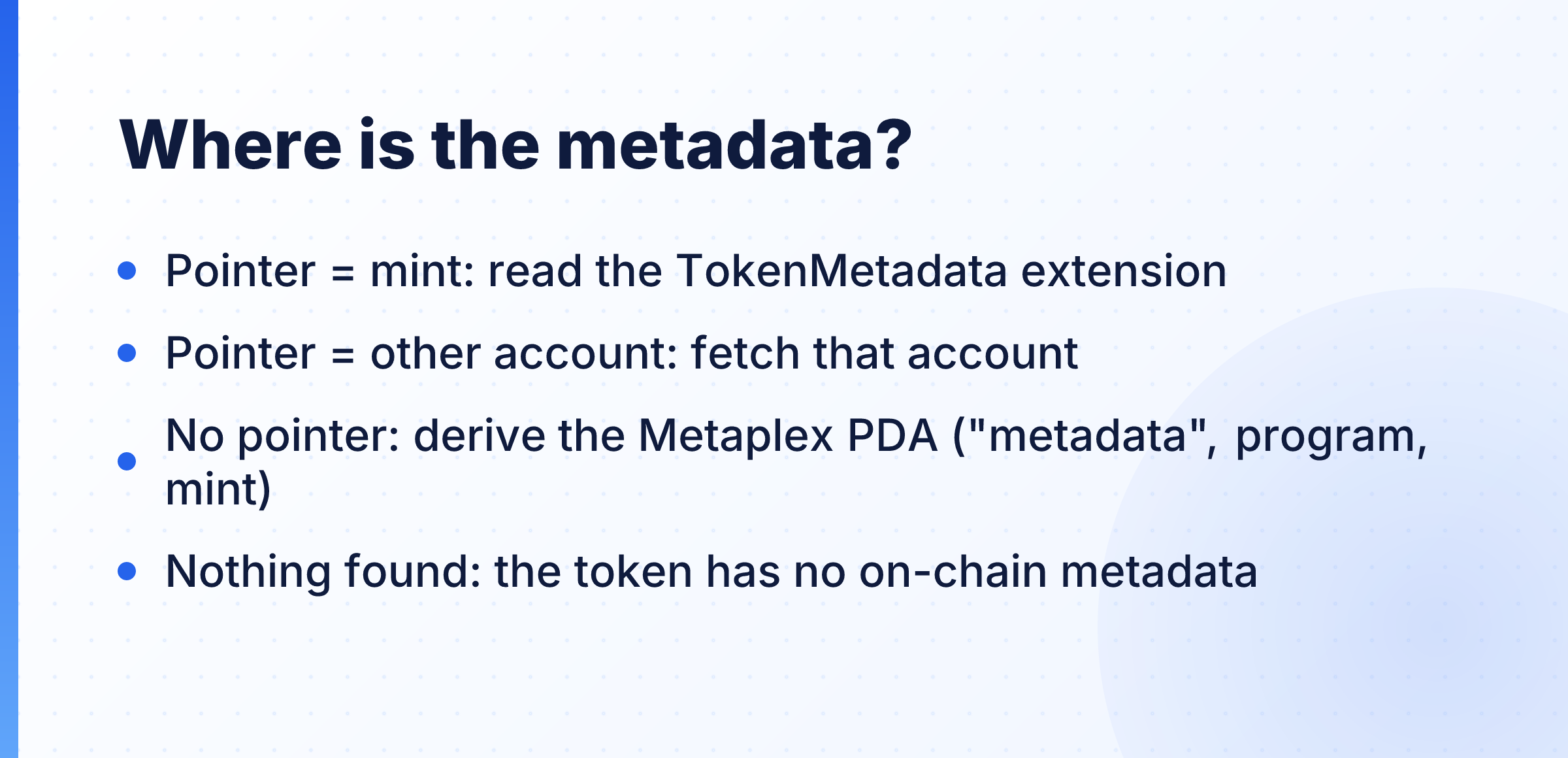
If none of these has anything, the token has no on-chain metadata. A common bug is to check only step 3 and then report "metadata not found" for a Token-2022 token that keeps it on the mint.
For Metaplex I decode the account by hand instead of adding a package. Metaplex's Kit-based client, @metaplex-foundation/mpl-token-metadata-kit 0.0.3, lists @solana/kit ^6.5.0 as a regular dependency, so a Kit 8.6 project would get a second, older copy of Kit. The bytes we need are simple anyway. A Metaplex Token Metadata account starts with a one-byte key, the update authority, the mint, and then name, symbol and URI as length-prefixed strings. Metaplex now calls Token Metadata a legacy program that is no longer recommended for new projects, but it is still supported, and established tokens such as USDC and BONK keep their metadata there (you will see both below).
src/metadata.ts:
import {
  addDecoderSizePrefix,
  address,
  fetchEncodedAccounts,
  getAddressDecoder,
  getAddressEncoder,
  getProgramDerivedAddress,
  getStructDecoder,
  getU32Decoder,
  getU8Decoder,
  getUtf8Decoder,
  isSome,
  unwrapOption,
  type Account,
  type Address,
  type MaybeEncodedAccount,
} from '@solana/kit';
import type { Mint } from '@solana-program/token-2022';
import { readMint } from './mint.ts';
import { inChunks, isMain, rpc } from './rpc.ts';

export const TOKEN_METADATA_PROGRAM_ADDRESS = address('metaqbxxUerdq28cj1RbAWkYQm3ybzjb6a8bt518x1s');

export type TokenInfo = {
  name: string;
  symbol: string;
  uri: string;
  source: 'token-2022 extension' | 'pointer account' | 'metaplex pda';
  account: Address;
};

// Metaplex Metadata starts with: key (u8), update authority, mint, then three
// u32-length-prefixed strings. We only need these first six fields.
// Metaplex pads name, symbol and uri with \0 bytes. Kit's getUtf8Decoder()
// strips them by default; a plain TextDecoder or Buffer.toString() does not.
const borshString = () => addDecoderSizePrefix(getUtf8Decoder(), getU32Decoder());
export const metaplexHeaderDecoder = getStructDecoder([
  ['key', getU8Decoder()],
  ['updateAuthority', getAddressDecoder()],
  ['mint', getAddressDecoder()],
  ['name', borshString()],
  ['symbol', borshString()],
  ['uri', borshString()],
]);

export async function findMetaplexPda(mint: Address): Promise<Address> {
  const enc = getAddressEncoder();
  const [pda] = await getProgramDerivedAddress({
    programAddress: TOKEN_METADATA_PROGRAM_ADDRESS,
    seeds: ['metadata', enc.encode(TOKEN_METADATA_PROGRAM_ADDRESS), enc.encode(mint)],
  });
  return pda;
}

function decodeMetaplex(account: MaybeEncodedAccount, source: TokenInfo['source']): TokenInfo | null {
  if (!account.exists || account.programAddress !== TOKEN_METADATA_PROGRAM_ADDRESS) return null;
  const { name, symbol, uri } = metaplexHeaderDecoder.decode(account.data);
  return { name, symbol, uri, source, account: account.address };
}

// Step 1 of the decision: is the metadata on the mint, and if not, where to look?
function whereIsMetadata(mint: Account<Mint>): { found: TokenInfo } | { lookAt: Address; source: TokenInfo['source'] } {
  const extensions = isSome(mint.data.extensions) ? mint.data.extensions.value : [];
  const pointer = extensions.find((e) => e.__kind === 'MetadataPointer');
  const pointsTo = pointer ? unwrapOption(pointer.metadataAddress) : null;

  if (pointsTo === mint.address) {
    const ext = extensions.find((e) => e.__kind === 'TokenMetadata');
    if (ext) {
      const { name, symbol, uri } = ext;
      return { found: { name, symbol, uri, source: 'token-2022 extension', account: mint.address } };
    }
  }
  if (pointsTo) return { lookAt: pointsTo, source: 'pointer account' };
  return { lookAt: mint.address, source: 'metaplex pda' }; // PDA derived below
}

// Works for one mint or many: one extra RPC call per 100 mints.
export async function getTokenInfos(mints: Account<Mint>[]): Promise<(TokenInfo | null)[]> {
  const plans = await Promise.all(
    mints.map(async (mint) => {
      const plan = whereIsMetadata(mint);
      if ('found' in plan) return plan;
      const lookAt = plan.source === 'metaplex pda' ? await findMetaplexPda(mint.address) : plan.lookAt;
      return { lookAt, source: plan.source };
    }),
  );

  const toFetch = plans.flatMap((p) => ('lookAt' in p ? [p.lookAt] : []));
  const fetched = await inChunks(toFetch, 100, (chunk) => fetchEncodedAccounts(rpc, chunk));
  const byAddress = new Map(fetched.map((a) => [a.address, a]));

  return plans.map((p) => ('found' in p ? p.found : decodeMetaplex(byAddress.get(p.lookAt)!, p.source)));
}

if (isMain(import.meta.url)) {
  const target = address(process.argv[2] ?? 'EPjFWdd5AufqSSqeM2qN1xzybapC8G4wEGGkZwyTDt1v');
  const result = await readMint(target);
  if (!result) throw new Error(`No mint at ${target}`);
  const [info] = await getTokenInfos([result.mint]);
  console.log(info ?? 'No on-chain metadata found');
}
getTokenInfos takes a list for a reason. It works out every address first, then fetches them all with fetchEncodedAccounts, which uses one getMultipleAccounts call per chunk. A wallet with many tokens costs one extra RPC call, not one per token.
USDC, a classic mint, with npx tsx src/metadata.ts:
{
  name: 'USD Coin',
  symbol: 'USDC',
  uri: '',
  source: 'metaplex pda',
  account: '5x38Kp4hvdomTCnCrAny4UtMUt5rQBdB6px2K1Ui45Wq'
}
PYUSD, which keeps its metadata on the mint, with npx tsx src/metadata.ts 2b1kV6DkPAnxd5ixfnxCpjxmKwqjjaYmCZfHsFu24GXo:
{
  name: 'PayPal USD',
  symbol: 'PYUSD',
  uri: 'https://token-metadata.paxos.com/pyusd_metadata/prod/solana/pyusd_metadata.json',
  source: 'token-2022 extension',
  account: '2b1kV6DkPAnxd5ixfnxCpjxmKwqjjaYmCZfHsFu24GXo'
}
The uri points to an off-chain JSON file (image, description), which you fetch separately. USDC's Metaplex uri is empty on chain, so do not assume every token has one.
I could not find a mint whose pointer leads to a different account, so I have no real output for path 2. The code handles it by reading the pointed account as a Metaplex account.
The invisible characters in token names
Metaplex stores name, symbol and URI padded with null bytes to a fixed length. Metaplex's own Rust crate ships a clean() helper that "Removes all null bytes from a string." Years ago I built a token list UI that decoded names with a plain TextDecoder, and the search box failed to match names that looked identical on screen. It took me far too long to find the trailing \0 characters.
Kit handles this for you. Its getUtf8Decoder() strips null characters by default (removeNullCharacters defaults to true in @solana/codecs-strings). The repo has a small src/null-padding.ts that decodes USDC's name both ways. Its output:
"USD Coin\u0000\u0000\u0000\u0000\u0000\u0000\u0000\u0000\u0000\u0000\u0000\u0000\u0000\u0000\u0000\u0000\u0000\u0000\u0000\u0000\u0000\u0000\u0000\u0000"
"USD Coin"
The first line uses { removeNullCharacters: false }, which is what you get with TextDecoder or Buffer.toString(). The second is Kit's default. If you decode Metaplex data any other way, strip \0 yourself.
Put it together as JSON
The last file is the CLI. It reads the address once with fetchEncodedAccount. If a token program owns it and it looks like a mint, it runs the mint report. Otherwise it treats the address as a wallet.
The output is JSON, and that has one last trap. Kit returns bigint for supply, raw amounts and epochs, and JSON.stringify cannot handle them. When I printed a decoded USDC mint without help, this is what came back:
TypeError: Do not know how to serialize a BigInt
The fix is a replacer that turns every bigint into a string (MDN on this error). It is near the bottom of src/inspect.ts:
import { address, fetchEncodedAccount, unwrapOption, type Account, type Address, type EncodedAccount } from '@solana/kit';
import { TOKEN_PROGRAM_ADDRESS } from '@solana-program/token';
import { TOKEN_2022_PROGRAM_ADDRESS, decodeMint, fetchAllMaybeMint, type Mint } from '@solana-program/token-2022';
import { getHoldings } from './balances.ts';
import { describeExtensions } from './extensions.ts';
import { getTokenInfos } from './metadata.ts';
import { programName } from './mint.ts';
import { formatAmount } from './format.ts';
import { inChunks, rpc } from './rpc.ts';

// A mint is owned by a token program and is either 82 bytes (no extensions)
// or has account type 1 (Mint) at byte 165. A token account would have 2 there.
function isMintAccount(account: EncodedAccount): boolean {
  const tokenProgram =
    account.programAddress === TOKEN_PROGRAM_ADDRESS || account.programAddress === TOKEN_2022_PROGRAM_ADDRESS;
  return tokenProgram && (account.data.length === 82 || account.data[165] === 1);
}

async function inspectMint(account: EncodedAccount) {
  const mint = decodeMint(account);
  const [[info], { epoch }] = await Promise.all([getTokenInfos([mint]), rpc.getEpochInfo().send()]);
  const { mintAuthority, freezeAuthority, supply, decimals } = mint.data;
  return {
    type: 'mint',
    address: mint.address,
    program: programName(mint.programAddress),
    name: info?.name ?? null,
    symbol: info?.symbol ?? null,
    metadataSource: info?.source ?? 'none found',
    supply: formatAmount(supply, decimals),
    decimals,
    mintAuthority: unwrapOption(mintAuthority), // null means revoked
    freezeAuthority: unwrapOption(freezeAuthority),
    extensions: await describeExtensions(mint.address, mint.data, epoch),
  };
}

async function inspectWallet(owner: Address) {
  const holdings = await getHoldings(owner);
  // Batch reads: one getMultipleAccounts call per 100 mints, then the same for metadata.
  const uniqueMints = [...new Set(holdings.map((h) => h.mint))];
  const maybeMints = await inChunks(uniqueMints, 100, (chunk) => fetchAllMaybeMint(rpc, chunk));
  const mints = maybeMints.filter((m): m is Account<Mint> & { exists: true } => m.exists);
  const infos = await getTokenInfos(mints);
  const nameOf = new Map(mints.map((m, i) => [m.address, infos[i]]));

  return {
    type: 'wallet',
    address: owner,
    tokens: holdings.map((h) => ({
      mint: h.mint,
      program: h.program,
      symbol: nameOf.get(h.mint)?.symbol ?? null,
      amount: h.uiAmountString,
      rawAmount: h.amount,
      state: h.state,
    })),
  };
}

// JSON.stringify throws on bigint. Turn every bigint into a string.
const bigintReplacer = (_key: string, value: unknown) => (typeof value === 'bigint' ? value.toString() : value);

const input = process.argv[2];
if (!input) {
  console.error('Usage: npx tsx src/inspect.ts <wallet or mint address>');
  process.exit(1);
}
const target = address(input);
const account = await fetchEncodedAccount(rpc, target);
const report = account.exists && isMintAccount(account) ? await inspectMint(account) : await inspectWallet(target);
console.log(JSON.stringify(report, bigintReplacer, 2));
The mint check uses the layout from earlier: a classic mint is exactly 82 bytes, and a Token-2022 mint marks itself with the account-type byte at offset 165.
On 21 November 2026, npx tsx src/inspect.ts EPjFWdd5AufqSSqeM2qN1xzybapC8G4wEGGkZwyTDt1v printed:
{
  "type": "mint",
  "address": "EPjFWdd5AufqSSqeM2qN1xzybapC8G4wEGGkZwyTDt1v",
  "program": "Token",
  "name": "USD Coin",
  "symbol": "USDC",
  "metadataSource": "metaplex pda",
  "supply": "8365180380.607891",
  "decimals": 6,
  "mintAuthority": "BJE5MMbqXjVwjAF7oxwPYXnTXDyspzZyt4vwenNw5ruG",
  "freezeAuthority": "7dGbd2QZcCKcTndnHcTL8q7SMVXAkp688NTQYwrRCrar",
  "extensions": []
}
Wallet mode is where the batching shows. For the USDC mint authority wallet from earlier, the whole report took 5 RPC calls: one getAccountInfo to detect the type, two getTokenAccountsByOwner, one getMultipleAccounts for the seven mints and one for their Metaplex accounts. That is far below the public endpoint's limits.
Errors you will hit and how to fix them
The error texts below are copied from my own runs on 21 November 2026.
Half the tokens are missing. You queried one token program. Query both and merge, as getHoldings does.
"Metadata not found" on a Token-2022 token. You only checked the Metaplex PDA. Check the MetadataPointer and the TokenMetadata extension first.
Balances that are slightly off on some Token-2022 mints. The mint has Scaled UI Amount or Interest Bearing. Show uiAmountString or call amountToUiAmountForMintWithoutSimulation, and keep raw amounts for transfers.
Names that do not match even though they look the same. Null padding from Metaplex, decoded with something other than Kit's default UTF-8 decoder. Strip \0.
TypeError: Do not know how to serialize a BigInt. Pass the bigintReplacer to JSON.stringify.
429 from the public RPC. Through Kit it looks like this:
SolanaError: HTTP error (429): Too Many Requests
  cause: undefined,
  context: {
    __code: 8100002,
    headers: Headers {},
    message: 'Too Many Requests',
    statusCode: 429
  }
}
Batch your reads, and for anything beyond testing, set RPC_URL to your own endpoint.
413 Payload Too Large. I pointed an early version of the inspector at the System Program address, which owns a huge number of stray token accounts, and getTokenAccountsByOwner failed with SolanaError: HTTP error (413): Payload Too Large. The tutorial code does not handle owners like that. My advice, which I have not built into this repo, is to use your own RPC or query by mint.
A typo in the address. address() validates its input before any network call:
SolanaError: Expected base58-encoded address string of length in the range [32, 44]. Actual length: 14.
What you built
You now have a read-only token inspector on Kit 8.6, with no v1 code in it. Give it a wallet and it lists the tokens from both token programs. Give it a mint and it reports the owner program, the authorities, the Token-2022 extensions that change what a user sees (including display amounts that are not raw divided by 10 to the power of decimals) and the metadata, whether it sits on the mint or in the Metaplex account. All of that runs on one copy of Kit with no extra package.
The full project, with a README and every file runnable on its own, is at github.com/ogcryptogrinder/solana-token-inspector.
If I extend it next, I will fetch the off-chain JSON behind each uri so the report can show the token's image and description.
About the author
- I have been in crypto since 2014 and writing code since 2020. Here I write step-by-step tutorials on how tokens, wallets, liquidity pools and on-chain fees actually work on Solana and EVM chains, with tested TypeScript you can run yourself. The code for each tutorial is on my GitHub.
Comments
Join the discussionNo comments yet. Be the first to comment.